
What you get with ToggleWP free – and why a premium licence is worth it
ToggleWP V1.1 includes seven genuinely useful modules at no cost. Here is what they do, and what becomes available when you upgrade to a premium licence.
If you manage WordPress sites and wants them to behave properly — ToggleWP Free gives you a useful starting point without asking for anything in return.
Seven modules are available without a licence. They cover login security, staging awareness, media viewing, search behaviour, and scroll analytics. They are not feature-limited versions of premium tools. They are complete, fully functional modules that solve specific problems.
This post covers what those seven modules do, then explains what a premium licence adds and why it tends to be worth it for site builders / maintainers who want more control and fewer things to worry about.
The free modules
Login Monitoring

Every time someone logs into your WordPress site, ToggleWP records it: the user, the timestamp, the IP address, the country, and the browser. That history is searchable from your admin dashboard.
More usefully, you can restrict which countries a specific user is allowed to log in from. If your site’s admin account should only ever be accessed from the UK, you can enforce that. Attempts from outside the allowed countries are blocked, and the user can submit an access request if they are travelling.
GeoIP resolution is handled locally using a bundled MaxMind database — no external API calls, no data leaving your server.
This module is the foundation for Admin Notifications, which is available in premium. Login Monitoring collects the data; Admin Notifications acts on it.
Learn more about Login Monitoring.
Security & Authentication

A set of hardening options for the WordPress login system:
- Email-only login — disables username login entirely. Users must sign in with their email address. This closes a common brute-force vector, since usernames are often publicly visible on author pages.
- Admin domain lockdown — restricts admin-role accounts to email addresses at a specific domain (e.g.
@youragency.com). Anyone who does not match is blocked from reaching the admin. - User enumeration prevention — blocks REST API endpoints that expose WordPress user IDs and usernames.
- Password reset protection — returns a generic response to reset requests regardless of whether the email exists, preventing attackers from using the form to enumerate valid accounts.
None of these require configuration beyond switching them on.
Learn more about Security & Authentication.
Search Filters

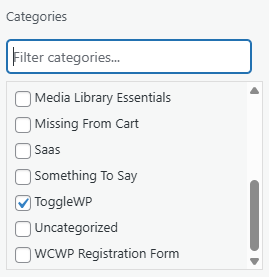
A small but consistently useful module. It adds a real-time search box above every taxonomy checklist in the WordPress admin — Categories, Tags, and any custom taxonomy your site uses.
If you are assigning categories to a post and your site has fifty of them, you no longer have to scroll. Type the first few letters of the term and the list filters instantly. Parent terms are preserved in the results so the hierarchy stays readable.
Zero configuration. Works on any taxonomy automatically.
Learn more about Search Filters.
Search Engine Warning

When WordPress’s “Discourage search engines from indexing this site” option is active, your site effectively disappears from Google. It is a setting that gets left on accidentally after a site migration, a staging-to-live move, or a development phase — and it can take weeks to notice.
This module adds a persistent warning to the admin bar whenever that setting is active. The warning links directly to Settings > Reading so it can be resolved in one click.
Learn more about Search Engine Warning.
Staging Site Warning

When you are working on a staging copy of your site, there is a risk of making changes in the wrong environment — editing the live site when you think you are editing staging, or vice versa.
This module adds a visible badge to the admin bar and optionally to the login screen whenever a staging sync is active. The text and colour are configurable. The point is to make the environment unmistakable.
Learn more about Staging Site Warnings.
Draggable Images

Adds a full-screen, zoomable, draggable image overlay to your site’s images. Users can zoom in with the mouse wheel or a pinch gesture, and drag to pan around the image without leaving the page.
You can enable it globally for all images in your posts and pages, or apply it selectively using a CSS class or a shortcode. Touch support is included.
Learn more about Draggable Images.
Scroll Tracking

Measures how far down your pages visitors actually read. For each page, the module records which scroll depth bracket a visit falls into: 0%, 1–25%, 26–50%, 51–75%, or 76–100%.
Results appear in a summary dashboard with per-page bar charts. You can export the data as CSV and configure how long records are kept (default: 30 days). No IP addresses are stored — the data is aggregate and session-based.
A quick-access link appears in the admin bar, and each post and page gets a row action for instant access to its scroll data.
Learn more about Scroll Tracking.
What a premium license adds
A premium licence unlocks eight additional modules. For people managing multiple WordPress sites the upgrade makes sense for a few reasons.
Peace of mind: Admin notifications

This is probably the strongest argument for upgrading if you are running a site your others.
Login Monitoring collects data. Admin Notifications turns that data into proactive email alerts. When someone logs in from a new IP address or a new country, you get an email. If an account has been inactive for over a month and suddenly authenticates, you get an email.
You can configure how often routine login notifications arrive (every login, daily digest, weekly, monthly, or never), while keeping security alerts — new IP, new country, inactive account — on immediate delivery.
There is also a monthly activity report that summarises user activity across the site. And every administrator can manage their own notification preferences via a personal opt-out link, so you are not forcing alerts on people who do not want them.
For a site owner who is not monitoring their server logs directly, this module provides a meaningful layer of awareness without requiring any technical knowledge to interpret.
Learn more about Admin Notifications.
Session control: Session management

Configurable session expiry for WordPress admin accounts. Instead of sessions lasting the default WordPress period (which can be very long), you set an expiry time — down to five minutes if you want it.
A live countdown timer appears in the admin bar so users know how long they have left. One click extends the session without a full logout cycle.
You can also see which users are currently active, force-logout any individual, or clear all active sessions at once. For a single site with multiple contributors or editors, this gives you control over who is actually inside the admin at any given time.
Learn more about Session Management.
Stop accidents before they happen: Plugin Control

Editors and other contributors often have more access to the Plugins screen than they need. This module lets you reduce that risk without restricting their role globally.
Specific plugins can have their deactivation link removed entirely — meaning no one can accidentally (or deliberately) switch off your caching, security, or maintenance plugins. Other plugins can be hidden from the list so they are not visible to anyone who does not need to see them.
You can also leave per-plugin notes visible to other admins, block specific plugin slugs from appearing in the WordPress.org search results, and build a curated recommendations tab with the plugins you actually endorse.
Learn more about Plugin Control.
Clean up the admin without writing code: UI Clean-up

WordPress admin screens accumulate notices, dashboard widgets, menu items, and interface elements from themes, plugins, and WordPress itself. Over time, the admin becomes noisy.
UI Clean-up lets you specify CSS selectors for elements you want hidden, and hides them via injected CSS. No child theme, no code editor, no risk of breaking something. You manage a list of rules from the admin, toggle them on or off, and reset to defaults if needed.
Learn more about UI Clean-up.
Never miss a renewal: Reminders

Plugin licences, hosting contracts, domain renewals, SSL certificates — these all have expiry dates that are easy to lose track of when they are managed across different accounts and dashboards.
The Reminders module is a lightweight tracker for all of it. You add each item (plugin renewal, service subscription, or general deadline) with its renewal date and set how many days prior to receive email alerts. You can add multiple alert triggers per item — for example, 30 days before, 7 days before, and the day before.
A dashboard widget shows upcoming renewals at a glance. When you delete a plugin, ToggleWP automatically creates a cancellation notice so the renewal does not linger in the list.
Learn more about Reminders.
Build Searchable Listings for Your Content: Filtered Directory

This is one of the more versatile premium modules for site maintainers who manage structured content.
Filtered Directory creates public-facing, searchable listing pages from any custom post type — including ones registered by other plugins like WooCommerce, events managers, or membership tools.
You define what fields each entry has, which fields appear on listing cards, which fields are filterable, and how the detail page is laid out. The module handles everything else: AJAX filtering with live faceted counts, pagination, featured images, and responsive card grids that shift from three columns on desktop to one on mobile.
Filtering works on taxonomy terms, which is where the module earns its place for content-heavy sites. If you are running a supplier directory, a resource library, or a member listing, visitors can narrow results by category, region, industry, or any other taxonomy your site uses — and the counts update live as filters are applied.
You activate a directory on any page using a single shortcode: Invalid or missing post_type attribute for [cptlisting].
Learn more about Filtered Directory.
Internal messaging: Messaging

A complete messaging system built into the WordPress admin. Inbox, sent, drafts, archived. You can send to individual users or broadcast to all users with a specific role.
Useful for small teams where you want a record of internal communications that lives in WordPress rather than in email threads or a separate tool. Messages support priority flags and reply threads. An unread count appears in the admin bar. An optional dashboard widget shows recent message activity.
Learn more about Messaging.
Grow your newsletter: Newsletter Subscribers

A frontend subscription popup for collecting email addresses. Bot protection is handled via honeypot fields. Collected subscribers are stored in your WordPress database, displayed in an admin dashboard, and forwarded to your email platform via webhook — Mailchimp, ConvertKit, ActiveCampaign, and any other service that accepts a standard webhook payload.
Learn more about Newsletter Subscribers.
What the upgrade costs and what you get
A premium licence unlocks all eight premium modules for one WordPress installation. The trial period is 14 days and requires no payment up front, so you can explore the full paid-for module set before committing.
The practical case for upgrading comes down to what kind of sites you are maintaining and how much passive awareness matters to you.
If your sites have any kind of user access — another admin logging in to upload content, a team member maintaining a blog, multiple contributors — Admin Notifications and Session Management alone change how much you know about what is happening day-to-day. A login from an unexpected country, an account you did not recognise, a session that should have expired — these are things that currently happen silently on most WordPress sites.
Reminders addresses a category of problem that has no equivalent WordPress solution. There is nowhere built into WordPress to track when your clients Gravity Forms licence expires or when their hosting contract is up for renewal. The consequence of missing those dates is always worse than remembering them.
Plugin Control and UI Clean-up reduce the surface area for accidents and confusion, particularly if anyone other than you has WordPress admin access.
And if you are managing structured content of any kind — a directory, a catalogue, a resource library — Filtered Directory removes what is typically a significant amount of custom development work.
The free modules are a genuine offering. The premium modules are the reason to stay.
Support
Community support for ToggleWP (free) will be via discussion board (coming very soon). That is the place to ask questions, report issues, and see how others are using the plugin. Support is not offered through social media platforms.