
Is your WordPress site actually sending emails? Now you’ll know
Why transactional email failure is a silent killer for WordPress sites — and how Email Health Monitor gives you a 24/7 early warning system.
There is a category of WordPress problem that you only find out about when a customer complains. Order confirmation emails that stopped sending three days ago. Password reset emails that have been failing silently for a week. A contact form that nobody has heard from since the last plugin update.
By the time you know about it, the damage is done. A customer assumes their order was lost. A user can not log in. A lead never got a response.
Email failure on WordPress is not unusual — it is almost inevitable at some point. What is unusual is knowing about it in time to do something.
Email Health Monitor is a new (experimental) module in the ToggleWP toolkit that gives you a continuous, scored view of everything your WordPress site is sending — and alerts you the moment something looks wrong.
The problem with WordPress email
WordPress sends emails for everything: order confirmations, password resets, user registrations, contact form notifications, membership renewals, security alerts. Most of these are transactional — they are expected by the recipient, often time-sensitive, and directly tied to revenue or trust.
The problem is that WordPress has no built-in visibility into whether any of this is working. wp_mail() fires, you hope it arrives, and you find out otherwise only when someone tells you.
There are three failure modes that catch sites out:
Silent failures. PHP’s mail() function returns true even when the email never leaves the server. No error, no log, no indication anything went wrong.
Volume drops. An e-commerce site that normally sends 40 order emails a day suddenly sends two. The site is functioning, WooCommerce is not throwing errors, but something upstream — a hosting change, a plugin conflict, a misconfigured SMTP plugin — has broken the pipeline.
Unexpected new senders. A newly installed plugin starts firing emails your customers were not expecting. Or worse, a compromised plugin begins sending emails you did not authorise at all.
Email Health Monitor catches all three.
How it works
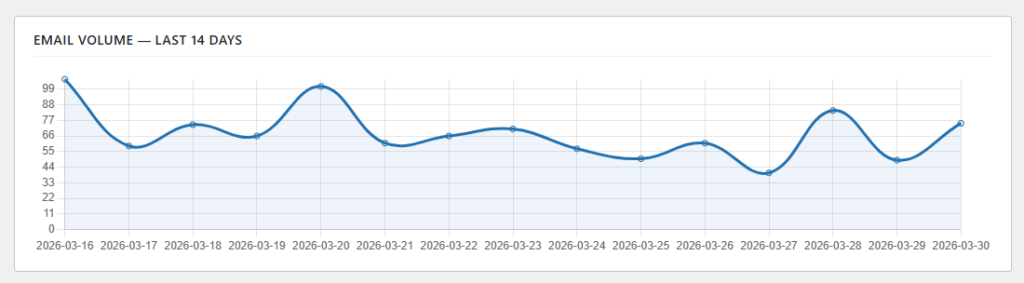
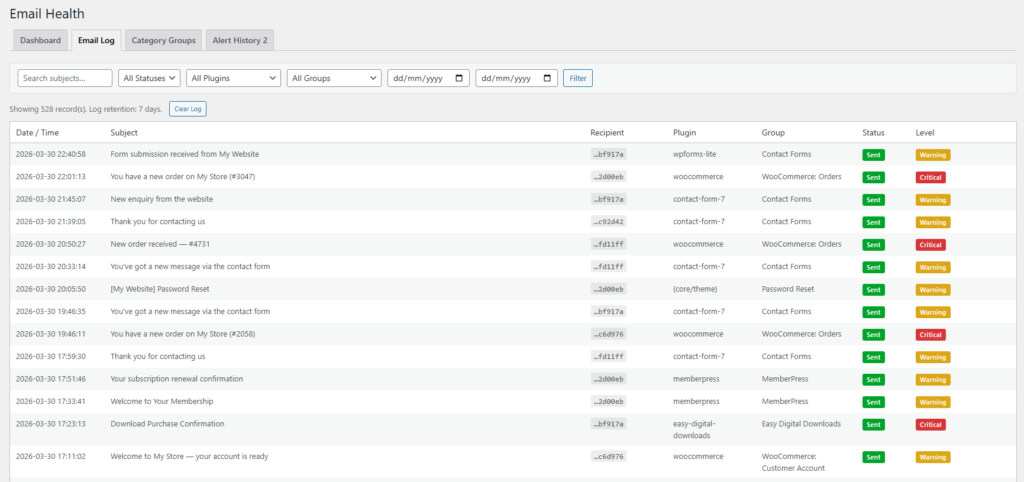
Every outgoing email from your WordPress site passes through a single WordPress hook. Email Health Monitor sits on that hook and records a log entry for each one: the date and time, the subject line, which plugin triggered it, whether it succeeded or failed, and which category it belongs to.
Recipient email addresses are never stored in plain text. The module stores a one-way SHA-256 hash — enough to detect patterns without ever persisting personal data in a recoverable form.
Every 15 minutes, a background check compares current email volumes against the 14-day rolling average for the same time window. The comparison is time-aware: if it is 9am, the current count is compared against what the 9am window looked like across the past two weeks — not against full-day totals that would make every early-morning check look like a drop.
When something deviates outside the configured thresholds, a webhook fires.
Category groups: Knowing what normal looks like
The 14-day baseline only means something if emails are grouped intelligently. A spike in password reset emails is a very different situation to a spike in order confirmations — one might indicate a brute-force attack, the other a successful flash sale.
Email Health Monitor uses category groups to organise emails by what they are and who sent them. Each group has its own alert level, drop threshold, and spike threshold, so you can configure how sensitive each category is independently.
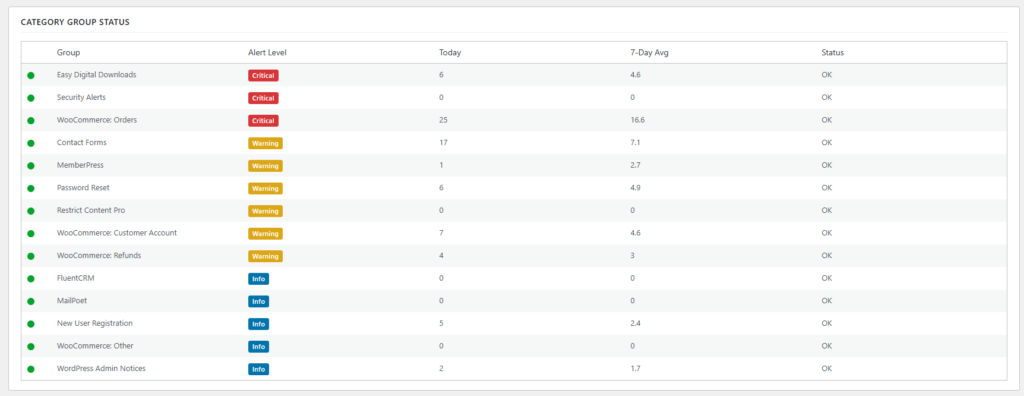
Fourteen groups are built in from activation:
- WooCommerce Orders, Refunds, and Account emails
- Contact Form submissions (Contact Form 7, WPForms)
- Security Alerts
- Password Resets
- New User Registrations
- WordPress Admin Notices
- Easy Digital Downloads
- MemberPress and Restrict Content Pro membership emails
- MailPoet and FluentCRM campaign emails
Each email is matched to a group through a two-pass process. First, subject line keywords are checked — so an email containing “Your order has been” routes to WooCommerce Orders regardless of which plugin sent it. If no subject pattern matches, the source plugin is used as a catch-all. If neither matches, the email is flagged as unmatched and you get a notification the first time a new category appears — useful for spotting an unexpected plugin or something more concerning.
You can add your own groups for anything the built-in set does not cover. And if an email shows up in the log without a matching group, a single click pre-fills the Add Group form with everything it knows about that email.
The health score
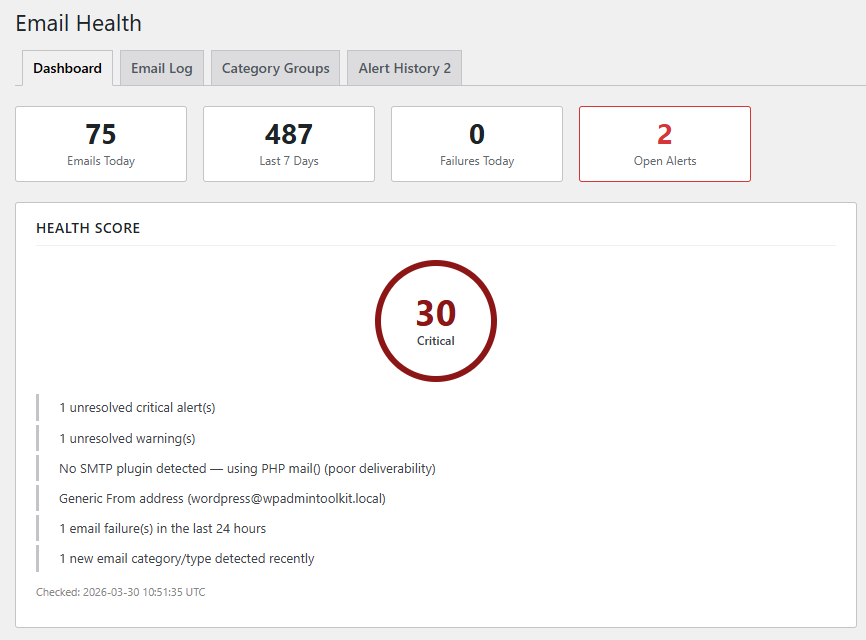
Rather than presenting a wall of data, Email Health Monitor distils everything into a single 0–100 health score displayed as a colour-coded ring on the dashboard.
Points are deducted for specific problems:
- Unresolved critical alerts (up to −75 points)
- Unresolved warnings (up to −30 points)
- No SMTP plugin detected — meaning emails are sent through PHP’s unreliable
mail()function (−15 points) - Generic From address — a
wordpress@,noreply@, orno-reply@sender that hurts deliverability (−5 points) - Email send failures logged in the last 24 hours (−10 points)
- A new, previously unseen email category detected in the last 24 hours (−5 points)
A score of 90 or above is Good. Between 70 and 89 is Fair. Between 40 and 69 is Poor. Below 40 is Critical.
The score is not just a traffic light — it is an actionable list of exactly what is dragging it down.
Alerts that actually reach you
Knowing there is a problem does not help if you find out by checking a dashboard. Email Health Monitor sends webhook alerts to wherever you actually pay attention.
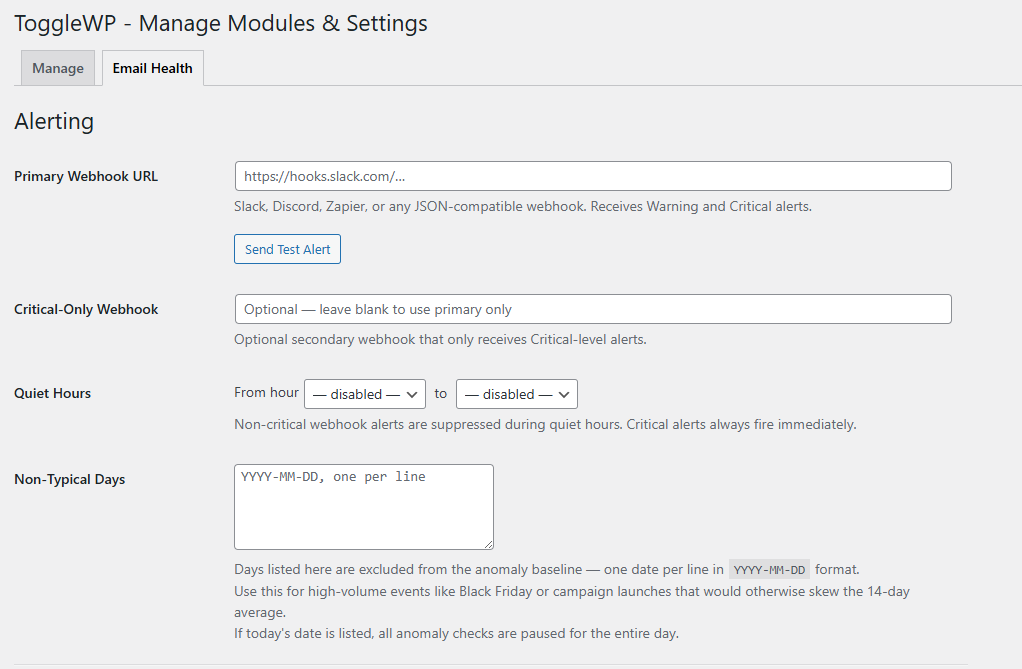
Slack and Discord are natively supported. Slack gets a colour-coded attachment — amber for warnings, red for critical. Discord gets a formatted embed with the same colour coding, auto-detected from the webhook URL. Zapier, PagerDuty, and any service that accepts JSON can be connected as well.
There are two webhook slots: a primary that receives all warning and critical alerts, and an optional secondary for critical alerts only — useful for routing severe issues to a dedicated Slack channel or an on-call system without flooding your general notifications.
Quiet hours suppress non-critical alerts during hours when nobody is watching anyway. Critical alerts always fire immediately regardless of the time.
Alert deduplication prevents the same issue firing repeatedly throughout the night. Critical alerts are suppressed for four hours once fired; warnings for twelve. When the underlying issue is resolved, you mark the alert resolved from the Alert History tab and the suppression clears.
Built for agencies too
If you manage WordPress sites for clients, the challenge is not any single site — it is knowing which of your sites has a problem right now without logging into each one individually.
Email Health Monitor’s webhook alerts centralise that awareness. Route all your client sites to a single Slack channel and you have a real-time feed of email health across your entire portfolio. Route critical alerts to a separate channel and you have an instant escalation path.
The admin bar indicator helps too. A pulsing red or amber dot appears on every admin page when there are unresolved alerts — so the moment you or a client logs into WordPress, the problem is visible without navigating anywhere.
Non-Typical Days handle the agency workflow reality of campaign launches and seasonal events. Mark Black Friday or a newsletter broadcast day as non-typical and those dates are excluded from the 14-day baseline. The anomaly detector does not flag a spike as unusual when you already knew it was coming — and if today is marked as non-typical, all anomaly checks pause for the full day so a planned high-volume send does not generate noise.
What it does not do
Email Health Monitor is not a deliverability testing tool. It does not send test emails to check spam scores or inspect email headers. It does not replace your SMTP plugin — it works alongside it, and in fact reduces your health score if no SMTP plugin is detected, because that is exactly the kind of configuration problem it is designed to surface.
It does not store email content or recipient addresses. Subject lines are logged to support pattern matching and filtering. Recipients are hashed. That is it.
Getting started
Email Health Monitor is a premium module in the ToggleWP Admin Toolkit. Once activated, it installs its database tables, registers its cron jobs, and begins logging immediately — no configuration required to start collecting data.
The first thing worth doing is connecting a webhook. Until an alert has somewhere to go, the module is still useful as a log and dashboard, but the real value is the early warning system — and that only works if alerts reach you.
After that, review the built-in category groups and adjust the thresholds for your site. An e-commerce site should probably have a low drop threshold on WooCommerce Orders — even a 20% drop in a three-hour window is worth knowing about immediately. A low-volume membership site might need the minimum average volume guard set higher to avoid alerts on thin-window noise.
If you want to see the full feature set before your real data builds up, the Settings tab includes a Generate Test Data tool that populates 30 days of realistic mock data across all 14 categories, including scripted anomaly events — a WooCommerce order drop, a password reset spike consistent with a brute-force attempt, a technical failure cluster, and an unexpected new email category from a plugin. It gives you a working dashboard to explore without waiting two weeks for a baseline to form.
Email Health Monitor is a premium module in the ToggleWP Admin Toolkit, available on sites running WordPress 5.6 or later. Recipient privacy is protected by design: email addresses are SHA-256 hashed before storage and raw addresses are never persisted.