
Your Spreadsheet Is Already a Custom Post Type – You Just Need to Import It
You’ve got a spreadsheet. Maybe it’s a list of local businesses, a product catalogue, a team directory, or a collection of resources you want to share on your site. You know WordPress can handle this kind of structured data — but every tutorial leads you down a rabbit hole of plugin stacks, settings screens, and configuration you don’t really need.
CPT CSV Importer takes a different approach. Upload your CSV, answer a few questions about your columns, and walk away with a working custom post type — data included. No page builders, no field framework plugins, no code.
Who Is This For?
CPT CSV Importer is aimed squarely at site owners who:
- Already have data in a spreadsheet and want it on their WordPress site without hiring a developer
- Want a simple frontend form for collecting new records from visitors — without the overhead of a form builder plugin
- Need submitters to be able to update their own records in future, without creating WordPress accounts for everyone
- Are running a directory, catalogue, resource list, or any other structured dataset that doesn’t need a full custom development project
If you’ve ever exported a Google Sheet and wondered how to get it into WordPress properly — this is the plugin for that.
Simple Data Doesn’t Need a Complex Setup
Plugins like ACF and Metabox are powerful tools — but they’re built for developers managing complex, custom-built sites. If you just want to get a straightforward list of records onto your WordPress site, that level of complexity works against you. You’re learning an interface, configuring field groups, figuring out display templates — all before a single piece of your actual data is in WordPress.
CPT CSV Importer is built for the opposite scenario: you already have the data (in a spreadsheet), you want it on your site, and you want a simple way to keep it updated and let others contribute to it.
Say you have a spreadsheet of local business listings — name, category, phone, address, email, website. With CPT CSV Importer:
- Go to Tools → CPT CSV Importer
- Upload your CSV
- Choose “Create new CPT from CSV”
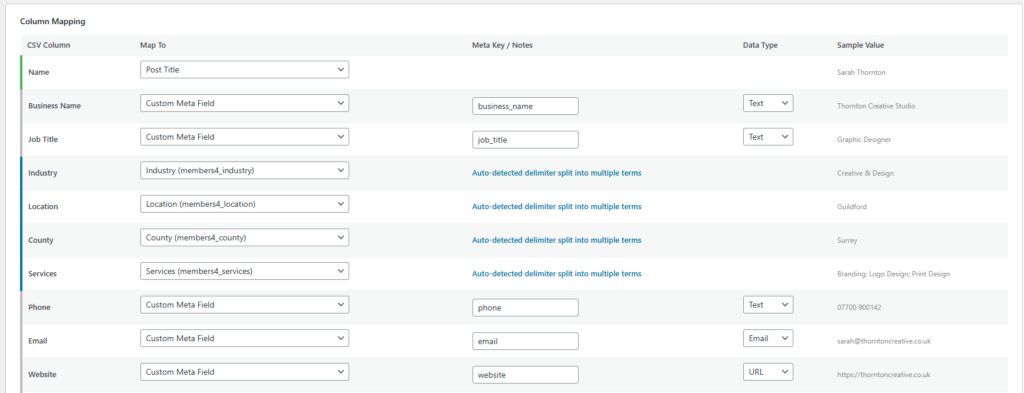
- Review the auto-detected column types
- Name your post type
- Click import
Done. No plugin configuration. No field groups. No template files.
What the Plugin Works Out for You
The plugin analyses your CSV headers and data before anything is created. It makes sensible suggestions:
- Columns where lots of rows share the same value (like Category or Region) are flagged as taxonomies — so you get proper filtering
- Columns with unique values per row (like Phone or Website) become meta fields
- The first column that looks like a name or title becomes the post title
You can override any suggestion before committing. Once you’re happy, click through and the import runs — your posts, terms, admin columns, and filter dropdowns are all set up in one go.
By the time the import finishes, you have:
- A fully registered custom post type
- All taxonomies created and linked
- All meta fields defined and ordered
- Every row from your CSV imported as a published post
- Admin list columns and filter dropdowns ready to use
Not Just Import — Collect New Data Too
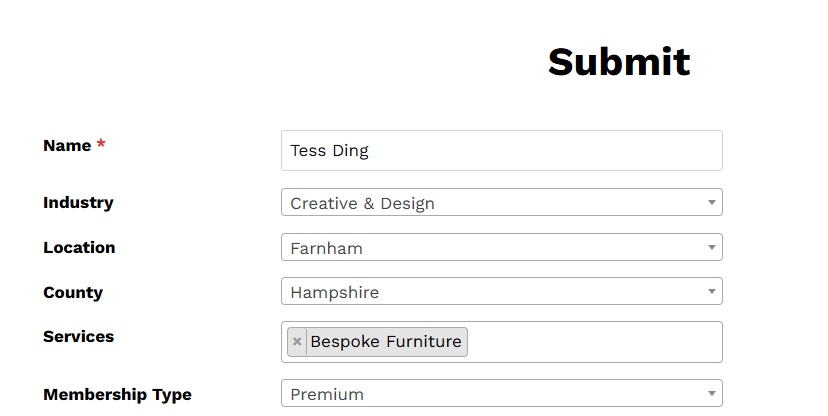
Here’s where it gets really useful. Once your CPT exists, you can drop a shortcode on any page to let visitors submit new records directly:
[cpt_submit_form post_type="business_listings" show="all"]The form is automatically built from your field definitions — in the exact order you set in the plugin’s Manage Fields screen. No form builder, no third-party plugin, no configuration beyond the shortcode itself.
The show attribute lets you control who sees the form:
logged_out— only anonymous visitors (great for open submissions or initial registrations)logged_in— only users who are signed in (for members-only contribution areas)all— everyone sees it
Submissions land in WordPress as drafts, so you can review them before they go live. You get an admin notification email for every new submission automatically.
Let Submitters Edit Their Own Records
This is the feature that really sets CPT CSV Importer apart: edit tokens.
When someone submits a record, they receive a confirmation email containing a private edit link. That link is unique to their submission. Clicking it reopens the form pre-filled with their data, and saving it updates the record in place — no new post, no duplicate.
You configure this in two steps:
- Include a field with “email” in the field name (e.g.,
contact_email) — the plugin picks this up automatically - Enable Confirm Submission and Allow Editing in the CPT settings
From that point on, every submitter gets a personalised “come back and edit this” link — sent straight to their inbox. Perfect for directories where listings need updating, event submissions where details change, or any situation where people should be able to manage their own record without needing a WordPress account.
Built-In Spam Protection
For anonymous form submissions, two layers of protection are baked in:
- Honeypot field — a hidden field that bots tend to fill in. If it contains anything, the submission is silently discarded.
- Timing check — the form requires at least 20 seconds to pass before a submission is accepted. Automated submissions are typically instant, so this catches the majority of bot traffic.
No CAPTCHA plugin needed for basic protection.
Get Started
The plugin lives at Tools → CPT CSV Importer in the WordPress admin. Prepare your CSV with headers in the first row, upload it, and the wizard walks you through the rest.
For step-by-step instructions, see the CPT CSV Import knowledge base articles.
Looking for a customisable frontend presentation layer in table format? Check out Barn2 Posts Table Pro (aff link). Customise your tables, combine columns, include media, plus more.