
Introducing calendar booking, with round robin built in
ClickTock will soon let visitors book time directly on your calendar — with fair round-robin rotation across your team from day one, and automatic blocking whenever a host’s real Outlook or Google Calendar already has that time taken.
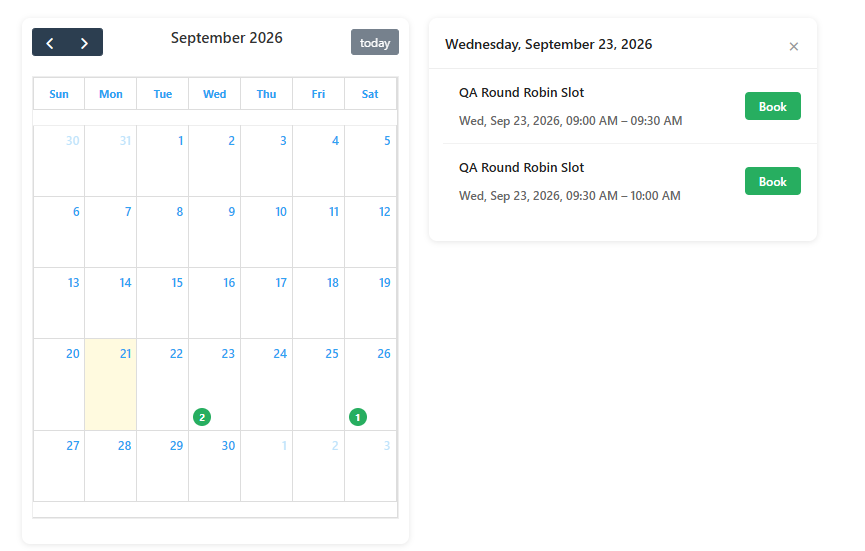
ClickTock started as a simple way to track time. This release adds something new: a full booking calendar, so clients and visitors can find an open slot and reserve it themselves — no back-and-forth emails, no double-booking.
And because most teams aren’t one person, booking didn’t ship as a single-host tool bolted on afterwards. Every slot can belong to a Host Group from the start, with new bookings rotating fairly across whoever’s in it.
One shared calendar, fairly split
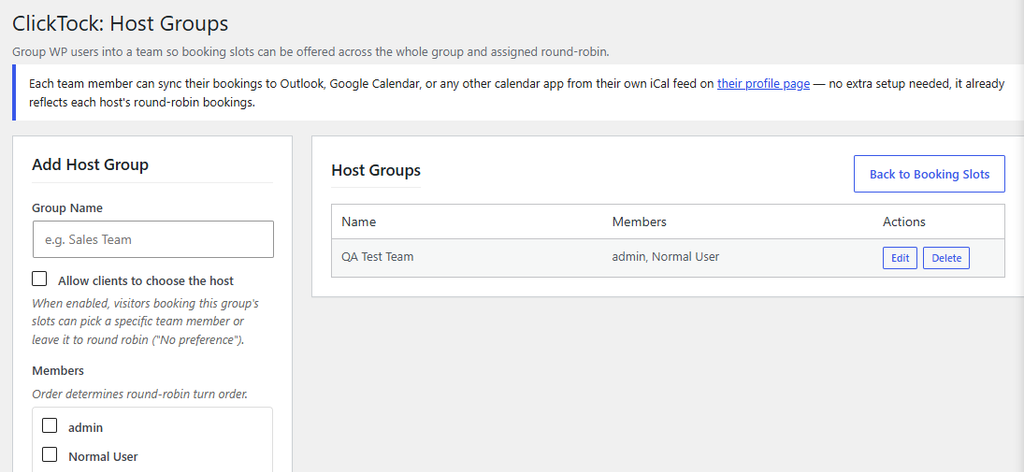
Set up a Host Group — Sales Team, Support Rota, whatever fits — and generate availability for the whole group at once. Visitors see one clean, bookable time slot. Behind the scenes, ClickTock is quietly deciding who actually gets it. Booking a single host works too — just skip the group and it’s you, and only you, on that calendar.
- Create a Host Group. Go to ClickTock → Host Groups, name your team, and add the people in it. Order sets the rotation.
- Generate shared availability. On the Booking Slots page, choose your Host Group instead of “Myself.” One slot appears publicly — no duplicate listings.
- Bookings rotate automatically. Each new booking goes to the next person in line. Everyone gets a fair, even share of incoming requests.
If a booking gets rejected: that time slot reopens for the same host — but the rotation still moves forward for the next new booking, so nobody ends up shouldering a disproportionate share of requests just because one meeting fell through.
Let clients choose, if you want to
Some teams want a strict, hands-off rotation. Others want visitors to pick who they’d rather meet. ClickTock now supports both — per Host Group.
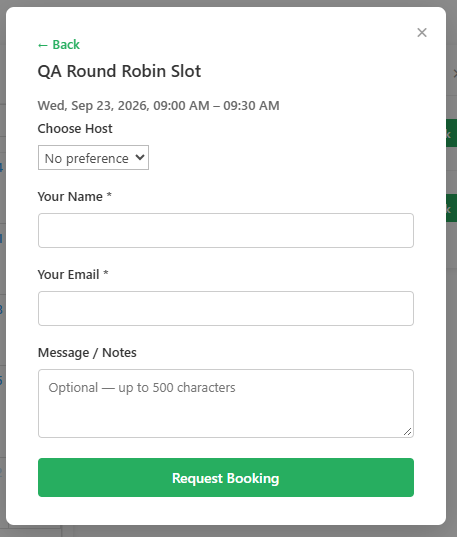
Turn on “Allow clients to choose the host” (off by default, per group), and visitors booking that group’s slots see a dropdown of available team members, plus a “No preference” option that hands the decision straight back to round robin.
No more double-booking against your real calendar
Round robin keeps ClickTock’s own slots fair — but hosts still live on Outlook or Google Calendar too. This release adds one-way sync: paste in your calendar’s secret iCal address, and ClickTock automatically blocks any booking slot that overlaps a meeting you’ve already accepted elsewhere.
- Paste your calendar’s iCal URL. On your WordPress profile page, under “External Calendar Sync,” add the secret address your calendar app already generates. ClickTock only reads busy/free times — never event details.
- Conflicts get blocked automatically. Every hour, ClickTock checks your calendar and marks any overlapping slot as unavailable — visitors just see it as booked, same as any other closed slot.
- Freed-up time reopens on its own. Move or cancel the conflicting meeting, and the next sync reopens the slot — no manual cleanup, ever.
Works with round robin, too: blocking is per host — if one team member’s calendar is busy, only their slot in that time window is affected. The rest of the Host Group stays bookable, and round robin keeps routing new requests to whoever’s actually free.
And it flows the other way too
Syncing isn’t just one-directional. Every host also gets their own private iCal feed — a personal subscribe link straight from their ClickTock profile page — so confirmed and pending bookings show up automatically in whatever calendar app they already live in day to day.
Subscribe once in Outlook, Google Calendar, or Apple Calendar, and new bookings keep appearing on their own, right alongside the external-calendar sync above. Between the two, a host’s real calendar and their ClickTock calendar stay in step without anyone copying events back and forth by hand.
Why it’s worth turning on
- No more back-and-forth — visitors book straight off your live availability
- Fairer workload — no manually checking whose calendar is fullest before opening slots
- Faster booking for visitors — one calendar, one click, no need to know who “should” take the request
- Flexible per team — run a silent rotation for one group and client’s-choice for another, or just book yourself, solo
- No double-booking — real-calendar conflicts block ClickTock slots automatically, and reopen just as automatically
Getting started
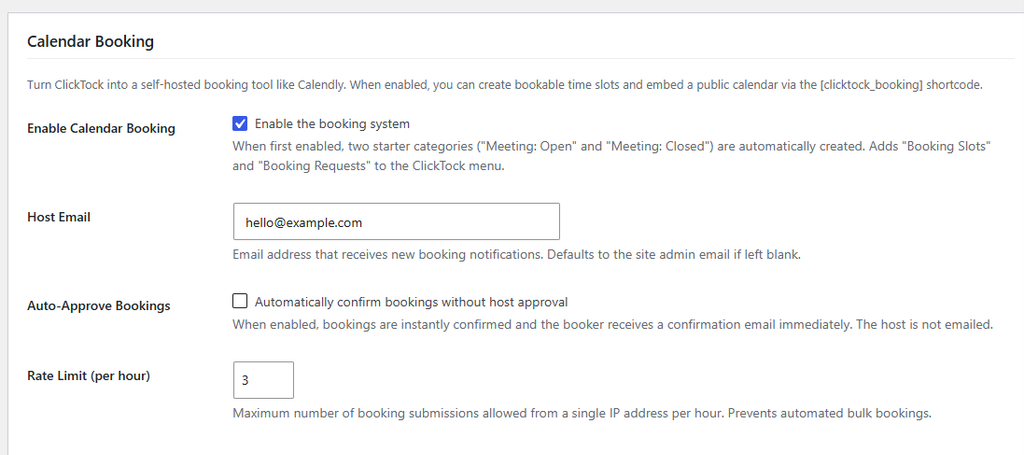
- Go to ClickTock → Host Groups and create your first team.
- Head to Booking Slots and generate availability using your new group instead of “Myself.”
- Optionally flip on client host choice for that group if you want visitors to have a say.
- On your profile page, paste your Outlook or Google Calendar’s secret iCal URL to stop double-bookings before they happen.
- On that same profile page, grab your personal ClickTock iCal feed and subscribe to it in your own calendar app.
That’s it — your new booking calendar is already doing the coordination work your team used to do by hand.
Have a team spread across time zones or specialties? Round robin works the same way — order your Host Group members however makes sense for your rotation.