
ClickTock Release Notes
= 2.9.1 – 15th Oct 2026 =
- Security: escape time entry, category and child-site data in the tracker, dashboard widget and admin bar timer (stored XSS).
- Security: Application Passwords are only honoured on ClickTock’s own REST routes, matched by URL path.
- Security: hosts can only see and manage their own booking slots and bookings; administrators manage all. Booking tokens are no longer sent to the browser.
- Security: external calendar sync no longer follows redirects and checks every resolved address (IPv4 and IPv6) against private ranges.
- Security: parent-site sync emails are signed (HMAC) instead of carrying the sync key; the site URL must match the registration; imported values are sanitised and duplicates skipped. Update ClickTock on child sites at the same time as the parent.
- Security: booking rate limits use the connecting IP only (filter
clicktock_client_ipfor trusted proxies). - Security: time tracking AJAX actions require the Author role or higher; viewing other users’ entries follows the Multi-user Reports setting.
- Security: no database errors or stack traces in AJAX responses.
- Security: the sync CSV is written to a private temp folder and guarded against spreadsheet formulas.
- Security: the Chrome extension CORS response no longer allows credentials (filter
clicktock_allowed_extension_idsto pin extension IDs). - Security: booking approve/reject links only act on pending bookings.
- Security: the sync mailbox password and Turnstile/reCAPTCHA secret keys are encrypted at rest and no longer printed into the settings page.
- Fix: with time rounding turned off, manual entries were saved as 1 minute.
- Fix: an unreadable date in a manual entry no longer causes a fatal error.
- Fix: the Reports page no longer requests a missing reports.js file.
= 2.4.1 – 14th May 2026 =
- Bug fix: Browser Extension wasn’t connecting on https sites
= 2.4 – 31st Mar 2026 =
- Browser Extension – Added a companion Chrome Extension.
= 2.3 – 13th Feb 2026 =
- Inactivity alert – Added a setting to show a browser notification if your tab has been inactive for over X minutes
= 2.2 – 6th Jan 2026 =
Important: I suggest deactivating & reactivating the plugin after updating to v2.2 to ensure then database migration code runs.
- Categories: Individual categories can now be hidden / shown in the admin bar drop down
- User Setting: Site Administrator can now hide the reminder setting from other users
- Emails: Weekly emails now support comma separated emails
= 2.1 – 12th Dec 2025 =
- Track time: When you log out of a site your active timer will now be automatically stopped
= 2.0 – 2nd Dec 2025 =
- Email reports: Added weekly / monthly reports sent by email
- Site Sync (Experimental): You can now sync data (via a dedicated email account) from child sites to a parent site
- Reporting: Redesigned the reporting screen to improve its layout
= 1.1.1 – 10th Oct 2025 =
- General Settings: Removed ‘Minimum Duration’ setting as ‘Round Time To’ replaced the need for it
- Bug fix: When ‘Round Time To’ was set to 1 minute it didn’t save the entry if it was less than 60 seconds
= 1.1 – 9th Oct 2025 =
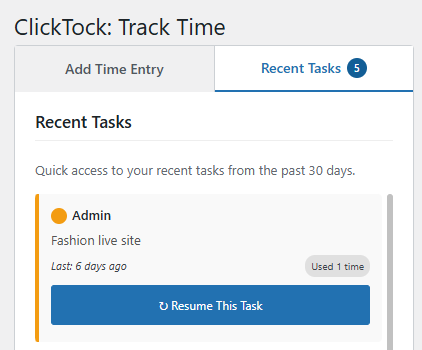
- Quick resume tasks: You can now resume tasks started on previous days via the Recent Tasks tab.
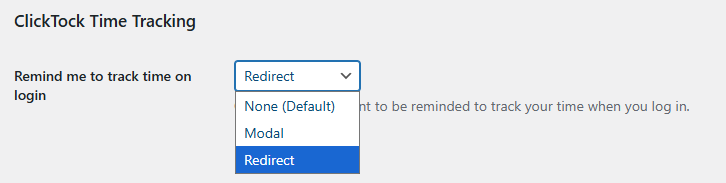
- User Setting: Added a per user reminder to track your time, either modal or redirect to the time tracker.
= 1.0.5 – 3rd Sept 2025 =
- Settings: Added colour picker to change admin bar Start Timer background
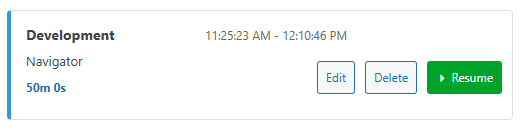
- Track Time: Added Resume button to each time entry. Copies details and auto starts timer
- Track Time: Stop Timer button now auto saves when clicked
= 1.0.4 – 12th Aug 2025 =
- Bug fix: Report screen now shows ISO dates for Day and Weekly reports.
= 1.0.3 – 7th Aug 2025 =
- Bug fix: Timer failed to save while on a ClickTock screen. Feedback suggested hiding Start / Stop while on these screens.
= 1.0.2 – 5th Aug 2025 =
- Dashboard Widget: See the top categories for the day with the new widget. Hover the top bar to see the configure settings to toggle active timer status / categories
- Bug fix: Adjusted Track Time screen panels to work with high res screens
- Bug fix: Export to CSV duration now in hh:mm:ss format instead of ‘5 minutes’
= 1.0.1 – 4th August 2025 =
- Bug fix on rounding time up to nearest X minutes
= 1.0.0 – 4th August 2025 =
- Initial release
- Core time tracking functionality
- Category management system
- Report generation with charts
- Admin bar timer integration
- Multi-user support
- Export capabilities
- Mobile-responsive design