
Track your time from any tab — Without handing your data to someone else
How the new ClickTock Chrome Extension gives freelancers and agencies a faster way to log hours while keeping full ownership of every minute.
If you are a freelancer, you already know the drill. You are deep in a task, making real progress, and the last thing on your mind is opening a new browser tab, logging into WordPress, navigating to the time tracker, and clicking Start. By the time you have done all of that, the moment is gone — and so is the accurate start time.
Time tracking tools promise to fix this. Most of them do, but at a cost: your data lives on their servers, your billing history is locked inside their platform, and if they change their pricing or shut down, your records go with them.
The new ClickTock Chrome Extension takes a different approach. It puts a lightweight timer directly in your browser toolbar — one click to start, one click to stop — while keeping every single entry safely stored in your own WordPress site.
The problem with “Just use an app”
There is no shortage of time tracking apps aimed at freelancers. Toggl, Harvest, Clockify — they all work, and they all have the same fundamental design: your data is hosted by someone else.
That means:
- Pricing risk. Free tiers shrink. Paid plans get more expensive. Switching costs you hours of exporting and reformatting data.
- Platform lock-in. Your invoice history, your client records, your project breakdowns — all of it is trapped in a proprietary format.
- Privacy. Your work patterns, client names, and billing rates are sitting on servers you have no visibility into.
- Reliability. When their service goes down, your reporting goes down with it.
For a solo freelancer, those risks feel abstract — until the day you actually need your data and realise you can not get it in the format you need. For an agency with a team of people, the risks compound: now you are trusting a third party with your entire operation’s billing data.
ClickTock is different by design
ClickTock is a WordPress plugin. You install it on a site you already own, and it stores everything in your own database. There is no third-party account to create, no monthly fee to a SaaS provider, and no vendor that can hold your data hostage.
Every time entry, every category, every client project — it all lives in your WordPress installation. You can query it directly, export it any time, back it up with your regular WordPress backups, and migrate it whenever you like.
That was already true of ClickTock before the Chrome Extension. But the plugin had one friction point: you had to be in the WordPress admin to start and stop timers.
The Chrome Extension removes that friction entirely.
How the extension works
Once installed, ClickTock lives in your Chrome toolbar as a small icon. Open it and you see the same two-tab interface you already know from the plugin:
Add Time Entry — select a category, write a description, hit Start Timer. That is it. The timer starts immediately and the badge on the icon ticks up in real time so you always know how long you have been working.
Recent Tasks — a list of your last 30 days of unique category and description combinations, each with a single Resume This Task button. Picking up a recurring client project takes mere seconds: open the extension, click Resume.
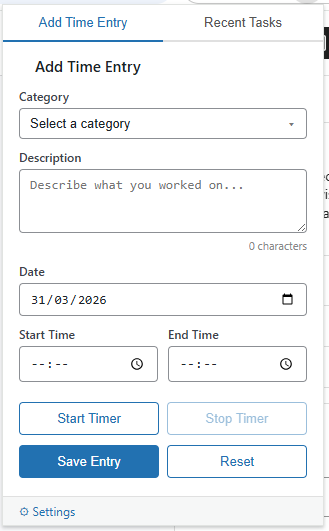
When you stop the timer, the entry is saved directly to your WordPress database through the REST API. Open your WordPress admin and it is already there, ready for reporting and invoicing.
The extension and the WordPress admin bar timer are fully in sync. Start a timer from the extension and the WordPress admin bar updates. Start it from the admin bar and the extension badge catches up within 60 seconds. Whichever interface you prefer, the data stays consistent.
Built for teams, not just solo freelancers
One of the most common questions about self-hosted time tracking is whether it scales beyond a single person. The answer with ClickTock is yes — and the Chrome Extension was built with that in mind from the start.
Each person in your agency gets their own set of credentials. Under the hood, the extension authenticates with WordPress using that individual’s username and a unique application password. This means every time entry is recorded against the right person — not pooled into a shared account — so when you pull a report, you can see exactly who tracked what, for which client, and for how long.
Setting up a new team member takes about a minute:
- Go to ClickTock → Settings → Chrome Extension in your WordPress admin.
- Find the team member in the Team Member Credentials table — it lists every WordPress user with time-tracking permissions.
- Click Generate next to their name. Their username and a unique application password appear inline.
- Share the site URL, their username, and their password with them. The password is shown once, so copy it before closing.
- They load the extension in Chrome, open Settings, paste in the three values, and click Test Connection.
That is it. Their extension is connected, and every entry they log appears in the WordPress reporting under their name. If someone leaves the team, click Revoke and their extension stops working immediately — no account deletion, no support ticket, no waiting.
Permissions follow the WordPress role system. Anyone with the Author role or higher can track time. Administrators and Editors can view multi-user reports. You do not need to invent a new permission model — ClickTock uses the one you already have.
Your data, your rules
The connection between the extension and your WordPress site uses WordPress Application Passwords — a built-in authentication standard that has been part of WordPress since version 5.6. There is no OAuth flow, no external authentication service, and no tokens stored on a third-party server.
Because each team member authenticates with their own credentials, there is a clean audit trail built in. Time entries carry a user ID. Reports can filter by person. If you ever need to produce a breakdown of hours by team member for a client, the data is already structured that way in your own database.
Built for the way freelancers and agencies actually work
The extension was designed around a few realities of this kind of work:
You switch contexts constantly. Moving between a client email, a code editor, a design file, and a document means you are rarely sitting on the WordPress admin screen. Having the timer in the toolbar means you can log time from wherever you already are.
Recurring work is the norm. Most freelancers and agencies bill the same clients for the same categories of work week after week. The Recent Tasks tab makes it trivial to resume a task you have done before without retyping anything.
Accuracy matters for billing. Because the timer starts and stops with a single click, there is no excuse to round up by ten minutes because you forgot to log the start time. The extension is right there in the toolbar.
You own your invoicing workflow. The extension does not try to invoice clients or send reports. It just tracks time. All the reporting, formatting, and invoicing happens in WordPress, where you control the output completely.
The data stays yours
It is worth saying this plainly because it is the thing that distinguishes ClickTock from every SaaS time tracker on the market.
When you close a project, the history is in your WordPress database — which is on your server, in your hosting account, under your control. When you want to calculate how many hours your team has spent on a particular type of work across two years, you can run that query yourself. When a client disputes a bill three months after the fact, you can pull up the exact entries with timestamps and the name of the person who logged them. When you decide to switch hosting providers, your time tracking records move with everything else.
No export. No “please wait 3-5 business days for your data download.” No format you have never seen before. Your data, in a standard WordPress database, exactly where you put it.
Getting started
At time of writing the browser extension is being published in the Chrome Web Store.
ClickTock is a WordPress plugin for self-hosted time tracking. The Chrome Extension requires WordPress 5.6 or later with the ClickTock plugin installed.