
Requires: Block based theme using the default image block.
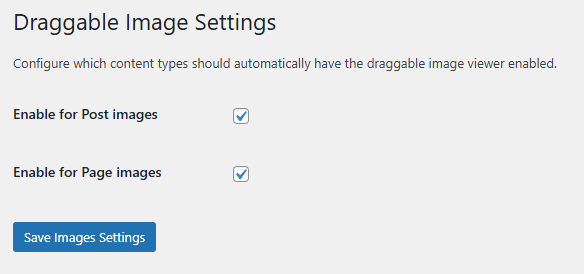
Accessed from the “Images” tab there are currently two settings to enable draggable images for Post images and Page images that use the default Image block. When enabled ToggleWP will attempt enhances images on your site with a full-screen viewer that supports zooming, panning, and dragging.
Key Features
- Full-Screen Overlay: Click any enabled image to view it in a dark overlay
- Zoom Controls: Zoom in/out with intuitive + and − buttons
- Pan & Drag: Move zoomed images around by dragging
- Touch Support: Works perfectly on mobile and tablet devices
- Keyboard Shortcuts: Press ESC to close the viewer
- Auto-Enable: Automatically apply to all post or page images
- Shortcode Support: Use shortcode for specific images
How to Use
Automatic Mode: Enable “Post Images” or “Page Images” to automatically make all matching images in posts or pages zoomable.
Manual Mode: Add the class “zoomable-image” to specific images, or wrap them with the shortcode:
[zoomable]<img src="your-image.jpg" />[/zoomable]